
Field Service Management in the UK: 2026 Guide for Growing Businesses
Running a field service business involves much more than sending an engineer to a customer site.
Every day, businesses need to manage customer enquiries, jobs, engineers, schedules, site information, service history, equipment, materials, reports and ongoing maintenance.
When all of this information is managed through separate spreadsheets, emails, paperwork and phone calls, it can become increasingly difficult to maintain visibility and control.
A job can be delayed.
An engineer may not have the latest site information.
The office may not know whether a technician is on the way or already on site.
A completed job report may take time to reach the office.
Managers may struggle to get a clear picture of what is happening across the field operation.
This is where field service management software can make a difference.
A modern field service management system connects office teams and field engineers through a central platform, helping businesses manage jobs, schedules, customers, sites and service activity more efficiently.
For UK businesses looking to improve their field operations in 2026, the important question is not simply whether they need software.
It is:
What should a modern field service management system actually help your business do?
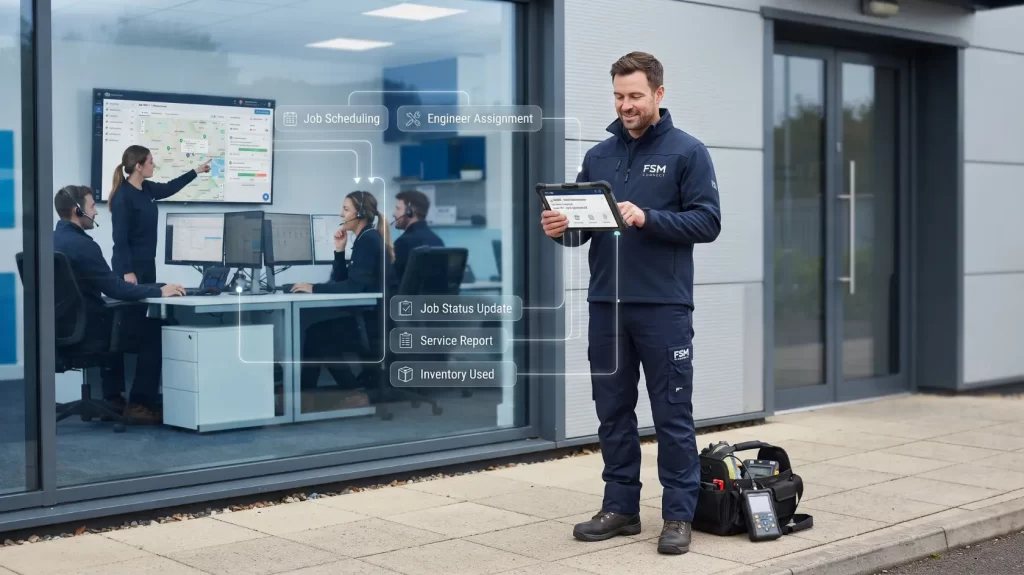
What Is Field Service Management?
Field service management (FSM) is the process of organising and managing work carried out by engineers, technicians and other mobile teams at customer locations.
This can involve:
- Creating and managing jobs
- Scheduling engineers
- Assigning field work
- Managing customer information
- Managing site information
- Tracking job progress
- Managing service and maintenance
- Recording engineer reports
- Managing tasks
- Tracking materials and stock
- Managing suppliers and purchase orders
- Capturing photographs
- Completing checklists
- Collecting digital signatures
- Monitoring job costs
- Analysing operational performance
The purpose is to bring these activities into a connected workflow.
Instead of the office, engineers and managers working from different information, everyone can work from a shared operational system.
For a growing field service business, this can provide greater visibility and reduce the amount of manual coordination required between teams.
Why Are UK Field Service Businesses Moving Towards Digital Management?
Field service operations are becoming increasingly complex.
A business may have:
- Multiple engineers
- Multiple customer sites
- Planned maintenance contracts
- Reactive service calls
- Different types of jobs
- Engineers with different skills
- Different equipment requirements
- Multiple teams working across different locations
Managing this manually becomes increasingly difficult as the business grows.
The problem isn’t necessarily that spreadsheets or email are bad tools.
The problem is that they weren’t designed to provide a complete operational view of a field service business.
For example, the office may have one spreadsheet for engineers, another for customers, emails containing job information and paper documents coming back from technicians.
Each system may work individually.
But the business still lacks one connected view of the operation.
The Hidden Problems Behind Manual Field Service Management
1. Missed or Delayed Jobs
When job information is spread across different systems, jobs can become difficult to track.
A shared system can provide a clearer view of:
Accepted → On Route → On Site → Completed
This type of status visibility is already part of the Nexus CRM workflow.
Managers and office staff can therefore understand where work currently stands without relying entirely on phone calls.
2. Too Much Paperwork
Paper job sheets, checklists and reports create additional administrative work.
They can also be:
- Misplaced
- Delayed
- Difficult to search
- Difficult to share
- Difficult to analyse
Digital job records allow information to be captured directly in the field.
Engineers using Nexus Mobile can access jobs, schedules and history, capture photographs, complete checklists and collect digital signatures.
3. Communication Gaps Between Office and Engineers
One of the biggest challenges in field service is keeping office and field teams working from the same information.
An engineer may receive information in the morning, while the office receives an update later.
This creates unnecessary communication.
With a connected field service platform, the office can have visibility of job progress while engineers can access the information they need from the field.
Nexus CRM’s Manage Diary provides a real-time calendar for arranging engineers and tracking job status, while the mobile application connects engineers with their assigned jobs and schedules.
What Should Field Service Management Software Include?
There isn’t one universal feature list that every business needs.
The right platform depends on the industry, number of engineers, number of jobs and complexity of operations.
However, several capabilities are particularly valuable for growing UK service businesses.
1. Job Management
Job management should sit at the centre of the field operation.
A good system should make it easy to:
- Create jobs
- Assign jobs
- Track progress
- Record job actions
- Maintain job history
- Generate engineer reports
- Record customer feedback
- Monitor job-related costs
Nexus CRM’s Job Management functionality is designed around tracking jobs from enquiry through to job costing, maintaining job history and generating engineer reports.
This provides a central record of what happened during the service process.
2. Engineer Scheduling and Dispatch
Scheduling is one of the most important parts of field service management.
A dispatcher needs to understand:
- Which engineers are available
- Which jobs are scheduled
- Where engineers are working
- Which jobs are urgent
- What work has been completed
- What work is still outstanding
A digital scheduling system can provide a much clearer operational picture than managing appointments through spreadsheets and separate calendars.
For businesses with multiple engineers, this can become one of the most valuable parts of an FSM platform.
3. Mobile Field Service Management
Your engineers shouldn’t have to wait until they return to the office to access important information.
A mobile field service application can put relevant information directly in the engineer’s hands.
For example, Nexus Mobile provides access to:
- Assigned jobs
- Schedules
- Job history
- Site details
- Site location information
- Photos
- Checklists
- Digital signatures
It also supports offline working, allowing engineers to complete reports without an internet connection and send the information when connectivity returns.
For engineers working in basements, remote locations, industrial sites or areas with unreliable connectivity, offline capability can be particularly useful.
4. Customer and Site Management
Field service businesses don’t just manage jobs.
They manage relationships with customers and locations.
A customer may have:
- Multiple sites
- Multiple assets
- Previous service visits
- Maintenance requirements
- Different contacts
- Different job histories
- Job prerequisites and specific site requirements
Centralising this information allows office staff and engineers to access the relevant information when they need it.
Nexus CRM centralises customer and site information, including site details, job history and material requirements for access by office and field teams.
5. Service and Maintenance Management
Many field service businesses don’t only respond to breakdowns.
They manage ongoing service and maintenance work.
This can include:
- Planned maintenance
- Recurring service visits
- Maintenance contracts
- Warranty tracking
- Service history
- AMC tracking
Nexus CRM includes Service & Maintenance management along with warranty and AMC expiry tracking.
This can help businesses move from simply reacting to service requests towards a more structured maintenance operation.
6. Inventory and Supplier Management
Field service work often depends on having the right materials available at the right time.
If stock information is disconnected from operational activity, teams may struggle to understand:
- What materials are currently available
- What has already been used
- When stock needs to be replenished
- Which suppliers are involved
- Which purchase orders are outstanding
- What materials have been delivered to site and what is still pending
Nexus CRM includes stock, supplier and purchase-order functionality, together with goods receipt and product/reference code tracking.
It can also help teams track partial material deliveries to site, identify what remains outstanding, and understand how many further visits may need to be arranged to complete the work.
This helps connect operational requirements with inventory, purchasing and site activity, giving office teams better visibility over materials and the work still required.
7. Digital Reports and Documentation
Field engineers often need to record what happened during a visit.
That might include:
- Work completed
- Observations
- Photos
- Checklist results
- Customer confirmation or review
- Engineer notes
- Site information
Digital reporting means this information can be captured closer to the point where the work happens.
It also gives the office a more consistent record of field activity.
8. Job Costing and Operational Visibility
Field service businesses need to understand how jobs are performing.
Job costing can help businesses monitor the resources associated with particular work.
Nexus CRM’s current positioning includes job costing and AMC job costing, alongside job management, task management and reporting.
This is particularly useful for businesses that need greater visibility into operational performance without managing information across multiple disconnected spreadsheets.
9. Reporting and Dashboards
Data becomes useful when it helps managers understand what is happening across their business and make informed decisions.
A field service management system can help answer questions such as:
- How many jobs are currently open, in progress or completed?
- How many completed jobs are pending invoicing?
- How many quotations are currently pending?
- How many quotations have been won or lost, and what is their value?
- Which quotations require follow-up?
- Which engineers are assigned to jobs, and which engineers are available?
- How many jobs are overdue or waiting for action?
- Which purchase orders are still open or pending approval?
- Which AMC or warranty contracts are approaching expiry?
- What materials or parts are currently awaited?
- What does the current workload look like across the service team?
Nexus CRM provides dashboards and analytical reports with filters covering areas such as sales, quotations, sites, engineers, suppliers, jobs and service activity.
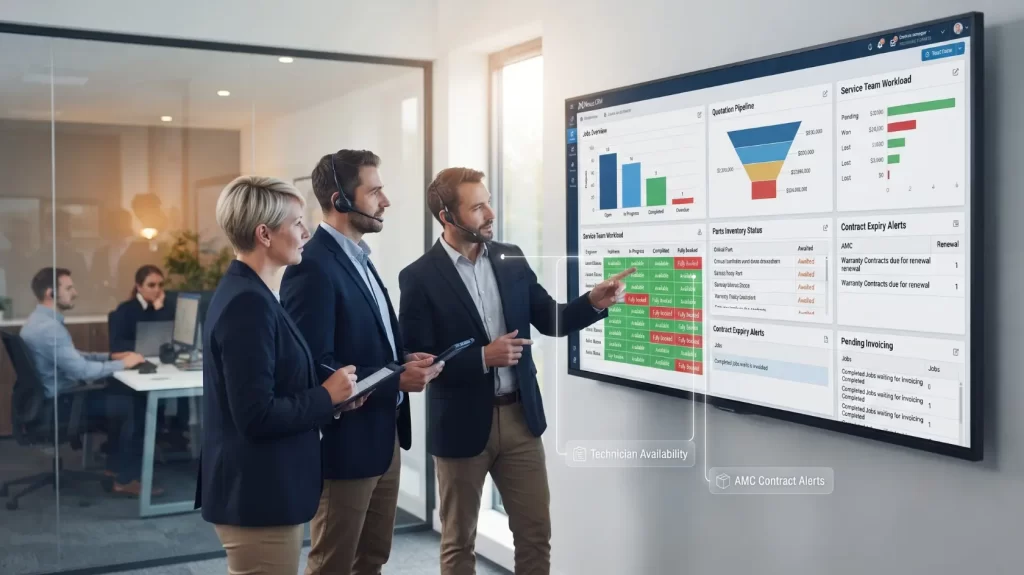
This gives managers a clearer view of job progress, quotation pipelines, invoicing requirements, purchasing activity and overall operational workload from a central dashboard.
Field Service Management for Different UK Industries
Different industries have different field-service requirements.
That is why an FSM system should be flexible enough to support different workflows.
Fire & Security
Fire and security businesses often manage inspections, maintenance visits and compliance-related service work.
An FSM system can help organise engineers, sites, service history, checklists and job documentation.
Facilities Management
Facilities management teams often operate across multiple customer locations.
They need visibility of:
- Sites
- Planned maintenance
- Reactive jobs
- Engineers
- Service history
- Recurring work
Nexus CRM is designed to support multi-site jobs and recurring maintenance schedules.
HVAC & Mechanical
HVAC businesses need to manage service calls, engineer schedules, equipment information and maintenance activity.
Centralised job and site information can give engineers better visibility before attending a customer location.
Electrical & Technical Services
Electrical and technical businesses can use FSM software to manage technical jobs, engineers, site information, task management and completion reports.
Construction & Trades
Construction and trade businesses often have teams working across different sites.
Keeping the office and site teams aligned can help managers maintain visibility of job progress.
Property Maintenance
Property maintenance businesses may manage multiple properties and recurring maintenance requirements.
Centralised site and service history can make it easier to understand what work has previously been completed at each location.
These six industries are specifically reflected in the current Nexus CRM positioning.
What Does a Modern Field Service Workflow Look Like?
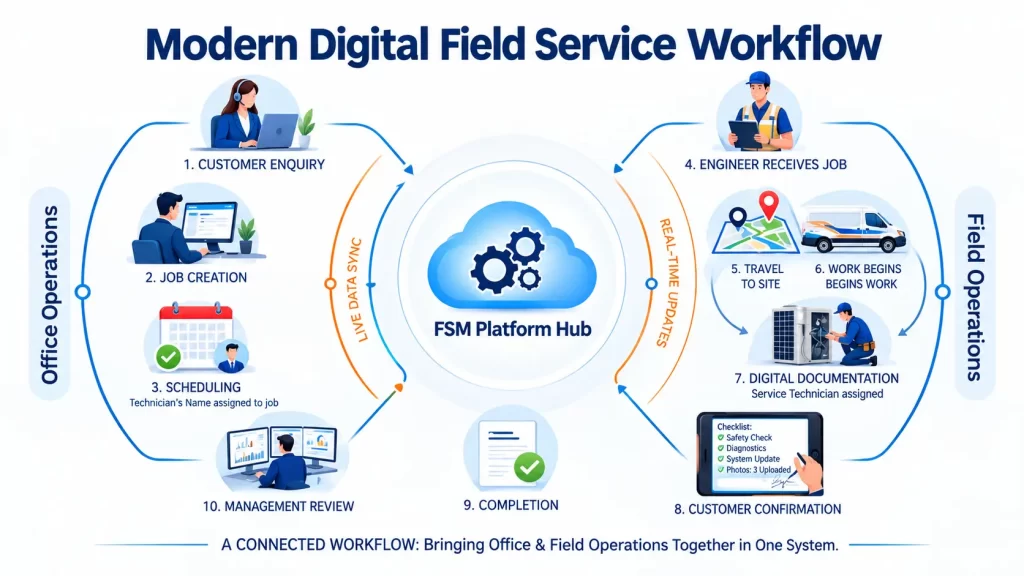
A simple digital field service workflow can look like this:
Step 1 — Customer Enquiry
A customer contacts the business with a service requirement.
Step 2 — Job Creation
The office creates the job and records the relevant customer and site information.
Step 3 — Scheduling
The job is assigned to an appropriate engineer.
Step 4 — Engineer Receives the Job
The engineer accesses the job through the mobile application.
Step 5 — Engineer Travels to Site
The job status can move to On Route.
Step 6 — Work Begins
The engineer updates the status to On Site and completes the required work, checks or tasks.
Step 7 — Digital Documentation
The engineer can record notes, photographs, checklists and other relevant information.
Step 8 — Customer Confirmation
A digital signature can be captured where required.
Step 9 — Completion
The job is marked as completed and the relevant report is generated.
Step 10 — Management Review
The office and management team can access the resulting information and use reporting tools to analyse operations.
This type of connected workflow is the core idea behind field service management: bringing the office and field operation together in one system.
Why Mobile and Offline Capability Matter for UK Field Teams
One area that is sometimes overlooked when choosing field service software is connectivity.
Engineers don’t always work in ideal environments.
They may work:
- Underground
- Inside large commercial buildings
- In remote areas
- In industrial facilities
- In plant rooms
- At construction sites
If the software completely depends on a continuous internet connection, field teams can experience problems.
Offline capability allows engineers to continue recording relevant information and synchronise it once connectivity becomes available.
Nexus Mobile specifically supports offline reporting.
For businesses with engineers working in challenging environments, this can be an important feature to evaluate.
How Much Does Field Service Management Software Cost?
There is no universal price for field service management software.
The cost depends on factors such as:
- Number of users
- Number of engineers
- Required functionality
- Mobile access
- Implementation
- Support
- Integrations
- Customisation
- Business requirements
Instead of asking only:
“What is the monthly software price?“
businesses should ask:
“What operational problems will this software solve for us?”
For example, if a platform helps an office team reduce time spent manually coordinating jobs, improves engineer visibility and makes job information easier to access, its value isn’t simply the subscription price.
The business should evaluate the overall operational improvement.

Enterprise FSM vs Practical FSM Software
Not every business needs a massive enterprise platform.
Large field service platforms can offer extensive functionality, but that doesn’t automatically mean they are the right choice for every UK business.
For a growing company, important considerations include:
- Ease of use
- Implementation
- Mobile functionality
- Scheduling
- Job management
- Customer management
- Service and maintenance
- Reporting
- Inventory
- Scalability
- Total cost
The goal should not be to buy the software with the longest feature list.
The goal should be to choose a system that solves the problems your team actually has.
For growing UK businesses, a practical platform such as Nexus CRM can provide a connected environment for managing jobs, engineers, customers, sites, maintenance, inventory and reporting without positioning the product around unnecessary complexity.
2026 Field Service Management Trends
More Mobile Field Operations
Field service businesses are increasingly moving information away from paper and desktop-only systems.
Engineers need access to information while they are working.
Greater Operational Visibility
Managers want to know what is happening across their field teams without waiting for end-of-day reports.
Real-time job status and centralised information can support better decision-making.
More Automation
Automation can help reduce repetitive administrative work.
Examples include:
- Job alerts
- Status updates
- Task reminders
- Scheduled maintenance
- Reporting workflows
- Customer feedback collection
Data-Driven Management
Field service businesses have access to more operational data than ever.
The challenge is turning that information into useful decisions.
Dashboards and analytical reporting can help managers identify patterns and understand performance.
Connected Office and Field Teams
The future of field service isn’t simply about giving engineers an app.
The bigger opportunity is connecting:
Customers + Sites + Jobs + Engineers + Scheduling + Maintenance + Inventory + Reporting
in one operational environment.
That is the direction in which modern FSM platforms are moving.
10 Questions to Ask Before Choosing Field Service Management Software
Before investing in a system, ask:
- Can it manage jobs from creation through completion?
- Can we schedule and manage engineers?
- Can engineers access jobs from mobile devices?
- Can engineers work when there is no internet connection?
- Can we manage customers and multiple sites?
- Can we track service and maintenance activity?
- Can engineers capture photos and digital signatures?
- Can we manage stock and suppliers?
- Can managers access useful reports and dashboards?
- Does the software fit our actual business rather than forcing us into unnecessary complexity?
These questions are more useful than simply comparing the number of features listed on different software websites.
Is Field Service Management Software Worth It for a Growing UK Business?
For a business managing only a handful of occasional field jobs, a sophisticated FSM system may not be necessary.
But as a company grows, the operational challenge changes.
More customers mean more jobs.
More jobs mean more scheduling.
More engineers mean more coordination.
More sites mean more information.
More service activity means more records to maintain.
Eventually, spreadsheets, email and paperwork can become a bottleneck.
At that point, field service management software can provide a central operational system for managing the growing complexity.
The value isn’t simply in replacing paperwork.
It is in giving the business better visibility, better coordination and better control of field operations.
Final Thoughts
Field service management in the UK is no longer simply about putting jobs onto a calendar.
Modern field service operations need to connect the office, engineers, customers, sites and service activity.
The right field service management software can help businesses:
- Organise jobs
- Schedule engineers
- Track field activity
- Improve communication
- Centralise customer and site information
- Manage service and maintenance
- Capture digital job records
- Manage inventory
- Monitor job costs
- Analyse operational performance
But the right platform isn’t necessarily the biggest one.
For growing UK businesses, the better question is:
Which field service management software gives our team the right capabilities without unnecessary complexity?
That’s where a practical, connected platform can make a difference.
Looking for Field Service Management Software in the UK?
Nexus CRM from MAS Solutions UK is designed for growing field service businesses that want to bring their office and field teams together.
From job management and engineer scheduling to mobile field operations, customer and site management, service & maintenance, inventory and reporting, Nexus CRM provides a connected platform for managing day-to-day field service operations.
See how Nexus CRM works for your business
Explore Field Service Management Software UK →
Frequently Asked Questions
What is field service management software?
Field service management software helps businesses coordinate jobs, engineers, scheduling, customers and reporting for work carried out at customer locations.
Who uses field service management software?
FSM software can be useful for businesses such as fire and security, facilities management, HVAC, electrical services, construction, trades and property maintenance.
What does Nexus CRM do?
Nexus CRM connects office and field teams across job management, scheduling, customer and site management, service and maintenance, inventory and reporting.
Does Nexus CRM have a mobile app?
Yes. Nexus Mobile connects engineers and technicians with assigned jobs, schedules, site information and job history.
Can engineers use Nexus CRM without internet?
Yes. Engineers can complete reports while offline and send them once connectivity becomes available.
Can Nexus CRM manage customer and site information?
Yes. Nexus centralises customer and site information, including site details, job history and material requirements.
Can Nexus CRM manage service and maintenance?
Yes. Nexus includes Service & Maintenance management as well as warranty and AMC expiry tracking.
Can Nexus CRM manage inventory?
Yes. Nexus includes stock, supplier and purchase-order functionality, together with goods receipt and product/reference code tracking.
What industries can use Nexus CRM?
Nexus CRM is positioned for fire & security, facilities management, HVAC & mechanical, electrical & technical services, construction & trades, and property maintenance.
How can I see Nexus CRM in action?
You can request a Nexus CRM demo to see how the platform handles jobs, scheduling, engineers, customers, maintenance, inventory and reporting for a field service operation.