
Best Field Service Management Software for Small Businesses in the UK
A practical, vendor-neutral guide to choosing the right FSM software – and knowing when software alone isn’t the full answer.
Summary
If you run a fire & security, HVAC, electrical, facilities management, or construction business in the UK, field service management (FSM) software helps you schedule jobs, track engineers, and manage customer and compliance records from one system, instead of spreadsheets, WhatsApp groups, and paper job sheets.
For most small UK service businesses, the right starting point is cloud-based FSM software priced per user per month, with mobile access for engineers, built-in quoting and job costing, and job history you can actually search. Enterprise-level platforms are usually overkill below around 15–20 engineers.
This guide walks through what to look for, what small businesses commonly get wrong, realistic UK pricing, and how to decide whether software on its own will fix your problem – or whether the bigger issue is admin capacity, not technology.
Table of Contents
- What Is Field Service Management Software?
- Signs Your Business Needs FSM Software
- Must-Have Features for Small UK Field Service Businesses
- Field Service Software vs CRM: What’s the Difference?
- How Much Does Field Service Management Software Cost in the UK?
- Comparing Your Options: A Framework, Not a Ranked List
- Common Mistakes UK SMEs Make When Choosing FSM Software
- Compliance Considerations: GDPR
- Software Alone vs Software Plus Back Office Support
- How to Choose: A Step-by-Step Framework
- Frequently Asked Questions
- Final Thoughts
What Is Field Service Management Software?
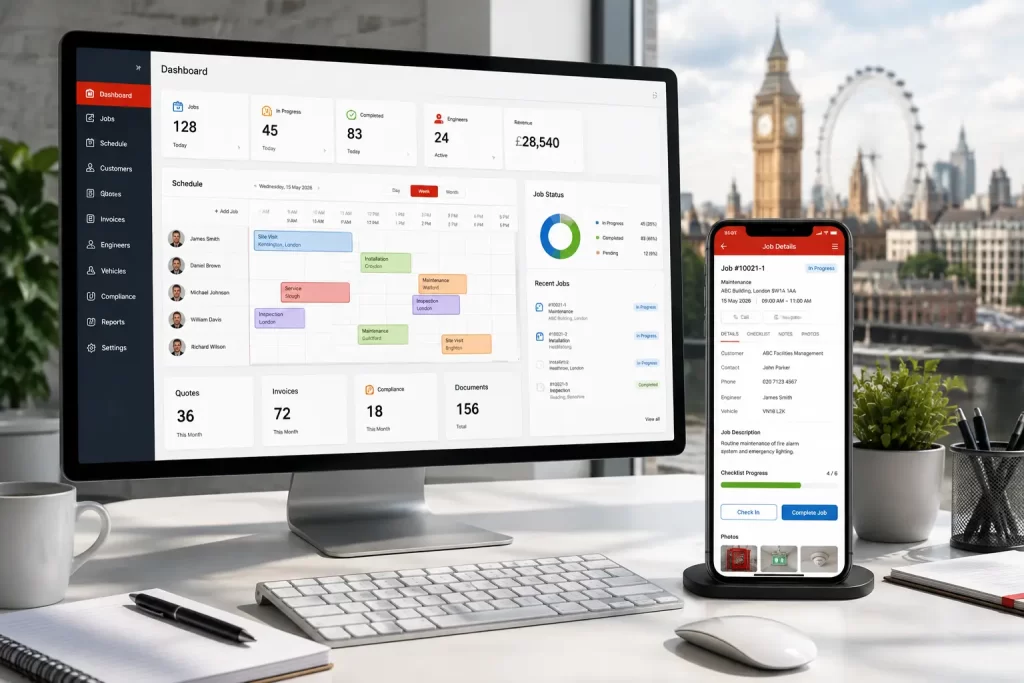
Field service management software is a system that helps businesses coordinate work that happens away from the office – site visits, installations, servicing, repairs, and compliance inspections. Most platforms bring together:
- Job scheduling and engineer diaries
- Mobile access so engineers can update jobs on-site
- Customer and site history
- Quoting
- Compliance documentation and certificates
- Reporting on jobs, engineers, and revenue
The aim is simple: replace disconnected spreadsheets, paper job sheets, and group chats with one shared system that the office and the field both work from.
Signs Your Business Needs FSM Software
Not every small business needs dedicated software immediately. A sole trader doing a handful of jobs a week can often manage with a diary and an invoicing app. FSM software earns its cost once you recognise patterns like these:
- Engineers are calling the office mid-job to check customer history or job details
- Job sheets, quotes, and invoices live in separate places, so nothing lines up
- You’ve missed a contract renewal or compliance deadline because nobody was tracking it centrally
- Scheduling depends on one person’s memory or a shared spreadsheet that’s often out of date
- You can’t quickly answer “how many jobs did we do for this customer last year?”
- Growth is stalling because admin work is scaling faster than revenue
If two or more of these sound familiar, it’s worth evaluating software properly rather than patching the current system further.
Must-Have Features for Small UK Field Service Businesses
Feature lists from software vendors can run to fifty items. For a small UK service business, most of that is noise. Here’s what actually matters, split into two tiers.
Genuinely essential
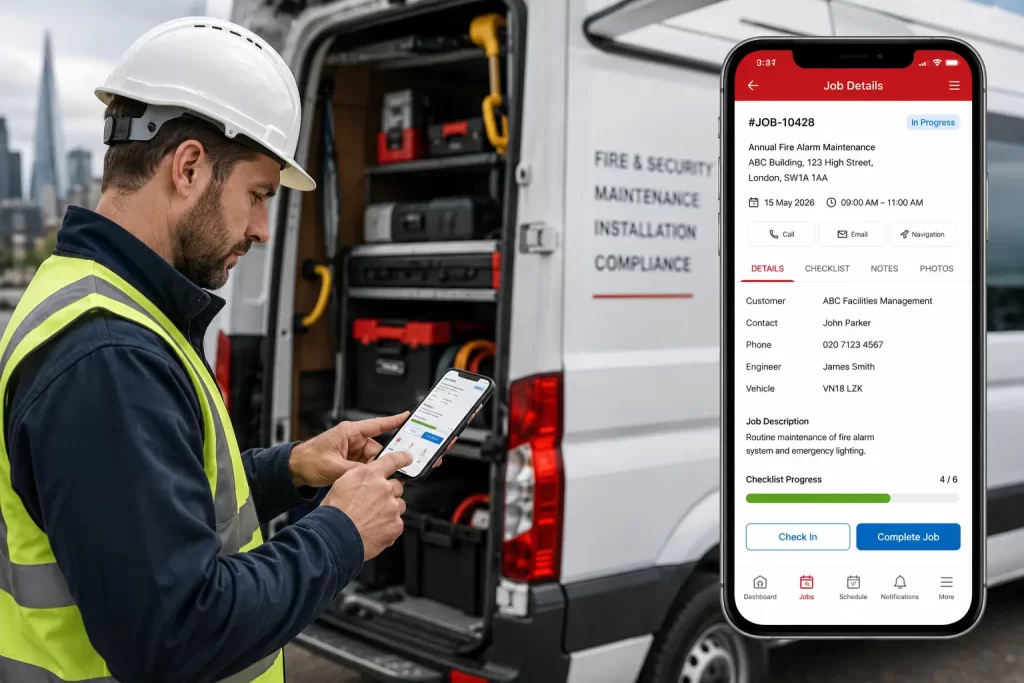
- Job scheduling and dispatch – a visual diary showing who’s doing what, where, and when
- Mobile app for engineers – ideally with genuine offline support, since engineers often work in basements, plant rooms, or rural areas with poor signal
- Customer and site history – so any engineer can see previous jobs, notes, and equipment on file
- Quoting – generated from job data, not re-typed from scratch
- Job costing and reporting – so you can see the true cost and profitability of each job in one place, without switching between systems (see how Nexus CRM approaches this)
- Compliance documentation – certificates, forms, and audit trails relevant to your sector (especially important for fire & security and gas/electrical work)
A useful exercise: list your current admin pain points first, then map features to those pain points – rather than starting from a vendor’s feature list and working backwards.
Field Service Software vs CRM: What’s the Difference?
These terms get used loosely, and it causes real confusion when comparing products.
| Type | Core focus | Best suited to |
| FSM software | Scheduling, dispatch, mobile job management | Businesses primarily coordinating engineers and site visits |
| CRM software | Customer relationships, sales pipeline, communication history | Businesses focused on managing leads, quotes, and long-term customer relationships |
| CRM + FSM hybrid | Combines customer management with job/engineer scheduling | Small-to-mid field service businesses that want one system rather than several |
Many small UK field service businesses find that a combined CRM and FSM platform hits the sweet spot – enough operational control without the cost and complexity of a much larger, all-in-one business system.
How Much Does Field Service Management Software Cost in the UK?
Pricing varies considerably depending on features and team size. Based on current UK market pricing, small business FSM software typically falls into these bands:
| Band | Typical monthly cost | What you generally get |
| Entry-level | From roughly £10–£30 per user/month | Job scheduling, mobile app |
| Mid-range | Roughly £30–£80 per user/month | Adds asset/PPM management, advanced reporting, more integrations |
A realistic first-year budget for a small UK field service business (fewer than 10 engineers) sits somewhere between roughly £1,000 and £5,000, depending on the number of users and features required. Free tiers exist for very small teams, but usually come with limits on users, jobs, or storage that a growing business will outgrow quickly.
Beyond the subscription cost, factor in:
- Data migration from your current spreadsheets or systems
- Staff training time
- Any custom configuration needed for your specific compliance or reporting requirements
Comparing Your Options: A Framework, Not a Ranked List
Most “best software” articles rank named products in order – which tells you more about the article’s affiliate relationships than about your business. A more honest approach is to work out which category fits your situation first.
If you’re a sole trader or 1–3 person team: a simple FSM app is often enough. Full FSM software may be more than you need right now.
If you’re a growing small business (3–15 engineers) juggling scheduling, compliance, etc. across separate tools: this is the sweet spot for mid-range FSM or combined CRM/FSM software – genuine operational gains without enterprise cost or complexity.
If you’re managing multiple sites, complex contracts, or significant stock and quatation requirements: it’s worth seriously evaluating larger, enterprise-level systems, accepting the higher cost and longer implementation.
If the real bottleneck is admin capacity, not the software itself: this is worth pausing on before you buy anything – covered in more detail below.
Common Mistakes UK SMEs Make When Choosing FSM Software
- Buying features you won’t use for another two years. Paying for advanced route optimisation or multi-site reporting before you need it adds cost and complexity without benefit.
- Ignoring the mobile experience. A platform that’s excellent on desktop but clunky or offline-incapable on mobile will frustrate engineers and slow adoption.
- Not checking how quoting actually works in practice. Ask to see a real quote-to-job workflow during a demo, rather than assuming it will match how your business currently operates.
- Underestimating data migration. Moving years of customer and job history out of spreadsheets takes longer than most businesses expect – budget time for it.
- Assuming software alone fixes an admin capacity problem. If your bottleneck is that nobody has time to manage the system, new software without more admin support often just moves the problem rather than solving it.
- Skipping the trial or demo. Get your own engineers and office staff to actually use it with real jobs before committing to an annual contract.
- Not asking about contract length and exit terms. Rolling monthly terms give you flexibility if the product doesn’t work out; long-term contracts can lock you in before you know if it’s the right fit.
Compliance Considerations: GDPR
Field service software holds a meaningful amount of personal and financial data – customer names, addresses, contact details, job history, and increasingly, payment information. UK businesses have legal obligations here regardless of size.
- Data protection: under UK GDPR and the Data Protection Act 2018, any business processing personal data – including customer records in an FSM system – must handle it lawfully and securely. The Information Commissioner’s Office (ICO) provides free guidance specifically for small organisations, and it’s worth checking your chosen software vendor’s data handling and storage practices as part of your evaluation, particularly if any part of their support or hosting is delivered outside the UK.
Neither of these should be a blocker to adopting FSM software – most reputable UK-facing platforms handle this correctly – but they’re worth a direct question to any vendor before you sign up.
Software Alone vs Software Plus Back Office Support
This is the part most buying guides skip entirely, and it’s often the actual deciding factor for small businesses.
Software solves the coordination problem: everyone working from the same information. It doesn’t solve the capacity problem: someone still has to enter data, update job records, manage inboxes, and keep the system tidy day to day.
For many small UK service businesses, the realistic choice isn’t just “which software,” but:
- Buy software and handle all the admin in-house – works well if you already have spare office capacity
- Buy software and hire an additional admin person – solves the capacity problem but adds a full salary cost
- Buy software paired with remote back-office support – a dedicated team handles scheduling, data entry, and customer communication within the system, without the overhead of an additional in-house hire
This is the model MAS Solutions works with: Nexus CRM, an all-in-one field service management platform built around real UK fire & security industry experience, paired with remote back-office support delivered by our dedicated team in India – which keeps ongoing costs down for UK SMEs without cutting corners on service quality. It’s not the only valid approach, but it’s worth considering if your actual constraint is admin time rather than the software itself.
How to Choose: A Step-by-Step Framework
- List your top three admin pain points – be specific (e.g. “quotes take two days to turn around,” not “admin is slow”)
- Map those pain points to the must-have features list above
- Shortlist 3–5 platforms that genuinely fit your business size, not the biggest names
- Ask each vendor about how quoting actually works, data hosting location, and contract flexibility
- Run a trial with real jobs and real engineers, not a sales demo with sample data
- Decide whether you also need additional admin capacity, separately from the software decision
- Start with core features and expand later – most platforms let you add modules as you grow, so there’s rarely a need to buy everything on day one
Frequently Asked Questions
What is the best field service management software for a small UK business? There’s no single “best” platform – the right choice depends on your team size, sector, and which admin tasks cause the most friction. Small UK service businesses typically do best with a mid-range, cloud-based FSM or combined CRM/FSM platform offering mobile access, built-in quoting, job costing, and compliance documentation, rather than large enterprise systems built for much larger operations.
How much does field service management software cost for a small business in the UK? Entry-level platforms typically start from around £10–£30 per user per month, with mid-range options between roughly £30–£80 per user per month. A realistic first-year budget for a business with fewer than 10 engineers is usually between £1,000 and £5,000, depending on features and team size.
Is there free field service management software available? Some providers offer free tiers or trials, usually limited by number of users, jobs, or storage. These can work for very small teams or as a way to trial a platform, but most growing businesses outgrow free tiers within a year or two.
What’s the difference between field service management software and a CRM? FSM software focuses on scheduling, dispatch, and mobile job management for engineers in the field. CRM software focuses on managing customer relationships, quotes, and communication history. Many small businesses benefit from a combined CRM/FSM platform rather than running two separate systems.
How long does it take to implement field service management software? This varies by provider and how much historical data needs migrating, but small businesses can typically expect a phased rollout over several weeks – starting with core scheduling and job management, then expanding to reporting and integrations once the basics are embedded.
Does field service management software help with GDPR compliance? Good software can support compliance by centralising and securing customer data properly, but the legal responsibility for GDPR compliance sits with your business, not the software vendor. Check the vendor’s data handling and hosting practices as part of your evaluation, and refer to the ICO’s small business guidance for your specific obligations.
What does Nexus CRM from MAS Solutions include? Nexus CRM is an all-in-one field service management platform covering job scheduling, engineer tracking, customer and site history, quotations, job costing, compliance documentation, and reporting. You can see the full breakdown on the Nexus CRM page.
Is it better to buy software or outsource back-office admin instead? These aren’t mutually exclusive. Software solves coordination between office and field; back-office support solves the ongoing admin workload of running the system day to day. Many small businesses benefit from combining both rather than choosing one over the other.
What size business is HVAC or fire & security field service software suitable for? Most platforms in this space are built with businesses from 1 to around 50 engineers in mind, with pricing and features scaling accordingly. Sector-specific compliance documentation (gas safety certificates, fire risk assessments, electrical certification) is worth checking for explicitly if you’re in a regulated trade.
Final Thoughts
Choosing field service management software isn’t really about finding the single “best” platform – it’s about matching software to the size and complexity of your actual operation, and being honest about whether your bottleneck is coordination, admin capacity, or both.
Start with your specific pain points, shortlist platforms that fit your business size rather than the biggest names in the market, and don’t assume software alone will fix a problem that’s really about having enough hands to manage the day-to-day admin.
If you’d like an unbiased second opinion on what your business actually needs – whether that’s software, back-office support, or both – MAS Solutions offers a free consultation to talk through your current setup and what would genuinely help.